
A photo of a sunset, a funny meme, or a wallpaper downloaded from a random site: they seem like harmless files, right? Yet inside any of these images, a threat can lurk. Cybercriminals today use a technique called steganography to hide malware inside image files, bypassing antivirus checks and successfully targeting even experienced users.
In this article, we’ll see how it works, why it’s effective, and how you can protect yourself—even if you’re not a tech expert. But if you’re curious about the technical side, you’ll also find details on how these attacks are built.
What is Steganography and How Does It Work?
In computing, steganography is the art of hiding information inside digital content. In the case of images, this means inserting data so that the image remains visually identical to the original, but contains code, a payload, or malicious instructions inside.
This technique leverages the way data is represented in raster images (like PNG, JPG, or BMP). Each pixel of an image is made up of numerical values representing colors: by modifying the least significant bits (LSB) of these values, binary data can be injected without visually altering the image.
For example, the RGB color (255, 255, 255) can be slightly changed to (255, 255, 254) without the human eye noticing any difference.
Classic example:
- Original image:
Pixel RGB = (10110010, 11001101, 11100011) - After injection (LSB steganography):
Pixel RGB = (10110011, 11001100, 11100010)
In this way, instructions, URLs, PowerShell commands, shellcode, or other payloads—often compressed or encrypted—can be hidden.
Some open-source tools (like Steghide, OpenStego, stegsolve) allow creating and detecting steganography, but more advanced cybercriminals prefer custom tools to evade automated checks.

Attack Pattern with Steganographic Images
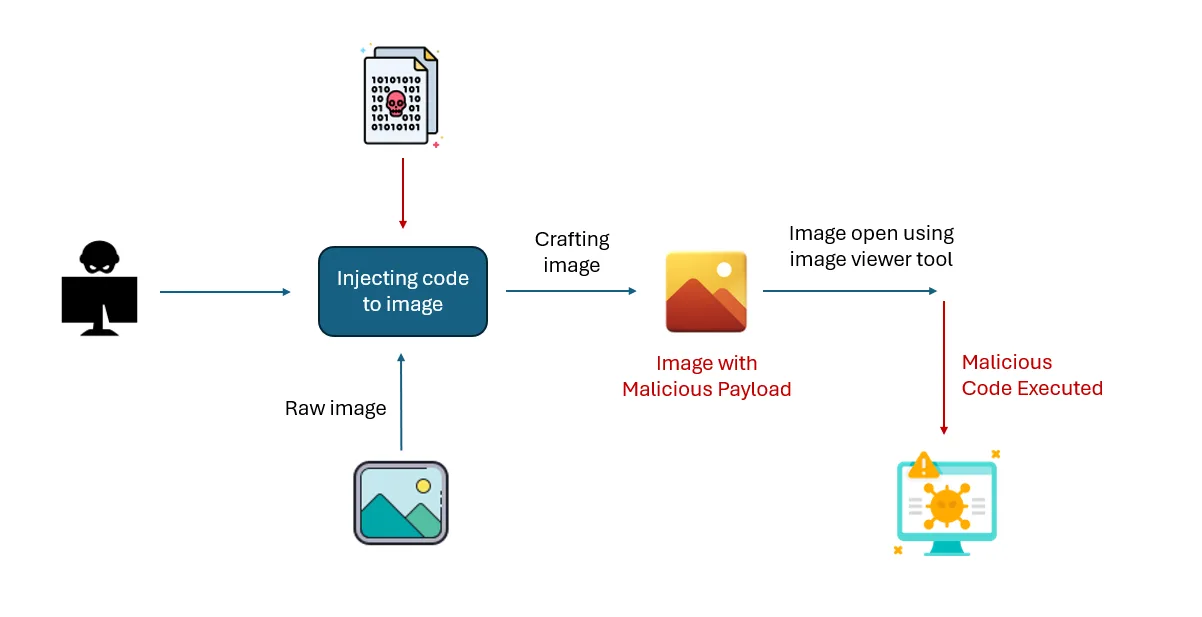
Often, a steganographic image is not the start of the attack but part of a larger chain. Here’s a simplified technical overview:
- Initial Compromise
The user receives a phishing email or visits a compromised site that downloads a loader—a small, hard-to-detect executable. - Download of the Steganographic Image
The loader fetches an image file (e.g., a .png) from a remote attacker-controlled server. The image looks harmless but contains the actual payload. - Payload Extraction
The loader contains code to read the hidden data from the image (usually decrypting a specific portion of bits). Once extracted, the malware is executed in memory, often without ever writing to disk (fileless execution). - Execution and C2 Communication
The malware begins its active phase: exfiltrating data, deploying ransomware, or establishing communication with a Command & Control (C2) server. Sometimes, C2 responses are also sent as steganographic images, allowing the malware to update or receive commands stealthily.
This approach makes behavioral analysis and static detection particularly difficult for antivirus solutions, which often only check file headers or visibly suspicious applications.
Why Is It So Hard to Detect?
One reason steganography is so effective—especially in malware—is that it shows no obvious signs. An infected image file, when opened with a normal viewer, behaves as expected: it displays a perfectly coherent visual content, with no errors, glitches, or anomalies.
Technically, data is often hidden by changing only the least significant bits of pixels, which—even if altered—do not visually affect the image. The effect is completely invisible to the naked eye.
Another reason is that these images easily pass standard security checks. Formats like PNG or JPEG are considered safe and are rarely deeply scanned. Many antivirus programs perform only superficial checks—often limited to file headers or size—and rarely inspect binary content bit by bit, especially if there’s no immediate execution linked to the file.
In corporate environments, the challenge grows: images can be loaded from legitimate URLs like GitHub repositories, CDNs, or common image-hosting platforms—making it impossible to distinguish legitimate traffic from malicious. Blocking all images from these domains would create countless false positives and operational issues.
Finally, steganography is often combined with other evasion techniques. An infected image almost never acts alone: it’s usually read by a loader already present on the system, which extracts the encrypted content and runs it in memory. This means malicious behavior is not tied to the image file itself but to the software interpreting it. As a result, even behavioral detection systems need to correlate events across multiple layers to identify the attack.
All this makes steganography not absolutely invisible—but highly effective at hiding. Detecting it requires specialized tools, specific expertise, and, above all, the awareness that any element can be used as an attack vector.
How to Defend Yourself
As with most cyberattacks, defending against steganography requires awareness, technical tools, and a solid security posture. Here are some best practices:
- Don’t trust unknown images: If you receive an image via email or message from an unfamiliar source (or one that looks unusual), avoid downloading it.
- Watch for abnormal system behavior: Slowdowns, remote connections, or suspicious process launches after opening an image file could be warning signs.
- Use advanced detection tools: Some antivirus suites include modules for detecting LSB steganography or fileless activity. In corporate settings, EDR tools can analyze memory and runtime behaviors.
- Keep systems and software updated: Many attacks exploit known vulnerabilities. An updated system is less exposed—even if the attack comes via an image.
- If you’re an IT professional or SOC analyst: Consider integrating tools like binwalk, zsteg, or ExifTool into your analysis pipeline for deeper inspection of suspicious images.
Conclusion
As we’ve seen, even a simple image file can become a danger to your devices. The key takeaway of this analysis is—once again—that knowing the most common attack techniques is essential for everyone, whether you’re a security expert, professional, hobbyist, or regular user. Awareness allows you to properly protect your devices and systems—both personal and corporate.
Found this article useful? Share it with friends and colleagues: the more people know, the safer we all are.