
Malware Analysis - Guide to Static Analysis of a Linux Malware (ELF)
This article is the first in a series dedicated to malware analysis, a focused path that will allow you to learn the basics of this discipline. In this first article, we concentrate on basic static analysis of a 64-bit ELF file. ELF (Executable and Linkable Format) is the standard format for executable programs on Linux, the equivalent of a .exe file on Windows.
This kind of file contains the program's machine code and the instructions for the operating system on how to load it into memory and execute it correctly. Besides programs, the ELF format is also used for shared libraries (.so) and object files (.o). The goal at this stage is not full reversing nor execution of the sample, but learning how to quickly extract useful indicators (metadata, segments, entropy, strings and information about packing) without executing the binary.
Basic static analysis consists of examining the executable file without directly viewing its instructions. This type of analysis can confirm whether a file is malicious, provide information about its functionality and, sometimes, allow extraction of simple network signatures (network signatures: domain name, IP, ports, URLs). Basic static analysis is easy to perform and can be very fast, but it is not very effective against sophisticated malware and can miss important behaviors.
"everything is open source if you can reverse engineer"
Fundamental Steps of Basic Static Analysis
The following sections describe the methodological procedures to inspect the malicious file at rest (that is, without executing it), a crucial process to obtain an initial, fundamental understanding of its structure and intent. Below is a bullet summary of what we will examine:
- Preliminary file analysis via Hash
- Packed/obfuscated malware and Entropy analysis
- Entropy analysis with binwalk
- Analysis of imported functions with Radare2
- Malware analysis with the file command
- Malware analysis with the readelf command
Preliminary File Analysis via Hash
Hashing is a common method used to uniquely identify a malware sample. The malicious software is processed by a hashing program, which produces a unique hash capable of identifying that malware - a sort of digital fingerprint.
The MD5 (Message-Digest Algorithm 5) hash function was long the most used in malware analysis, but today it is considered obsolete and insecure. Instead, more modern and reliable algorithms such as SHA-256 (Secure Hash Algorithm 256-bit) are preferred, although SHA-1 may still appear in some legacy or compatibility contexts.
sha256sum malware.elf
5eb69f3b46a0df45f5e4f2c0beede4a86f9aace3870dd8db28bc6521e69f363b malware.elf
The file hash allows searching for information related to the malware online, particularly on specialized platforms such as VirusTotal.
Packed and Obfuscated Malware and Entropy Analysis
Malware authors often use packing or obfuscation to make their files harder to detect or analyze. Obfuscated programs are those whose source code or binary has been deliberately made unreadable and difficult to analyze while preserving its original functionality. Packed programs are a subset of obfuscated programs in which the malicious program is compressed or encrypted and therefore cannot be directly analyzed. Both techniques will severely limit static analysis attempts on the malware.
Legitimate programs almost always contain many strings (readable text). Packed or obfuscated malware contains few intelligible strings. If, by searching for strings in a program with strings, you find only a few intelligible ones, it is likely packed or obfuscated, which suggests it could be malicious. You will probably need techniques beyond static analysis to investigate further.
strings malware_packed.elf | grep UPX
UPX!
nXH,)
OQ
lfF&(b
LNqm
The strings command extracts and displays printable character sequences (readable text) from any file, but it is mainly used on binaries. It allows quickly finding text, such as error messages or file paths, inside non-text files without analyzing their structure. In this case the strings command revealed only intelligible strings related to the UPX packer.
Once it is confirmed that the file was compressed with UPX, one can proceed to unpack it using the following command:
upx -d malware_packed.elf
Entropy Analysis with binwalk
Binwalk is a utility used to analyze, extract and "disassemble" binary files. It is particularly effective with firmware images (the software that runs devices such as routers, cameras, etc.). Binwalk's entropy analysis function is crucial for quickly identifying the "interesting" areas of a file.
binwalk -E malware_packed.elf
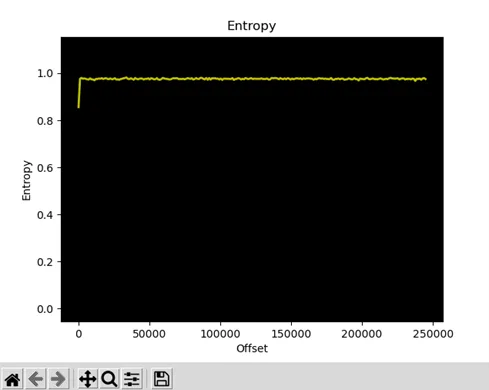
Analyzing another packed ELF malware sample, two indicators are immediately apparent. First, the strings command, as already seen, reveals almost exclusively intelligible strings related to the UPX packer. Second, entropy analysis with binwalk -E shows a uniformly high value, further confirmation that the file was obfuscated via compression. A high entropy value, in fact, implies a high degree of randomness and chaos in the data.
In other cases, entropy analysis with Binwalk might not produce significant results. For example, it might not detect any useful variation or might highlight high entropy peaks only in very limited areas of the executable. In the case of the malware we are analyzing, whose SHA256 we calculated at the beginning, we have no information on entropy because the executable file size is too small.
Analysis of Imported Functions with Radare2
Radare2 (often abbreviated r2) is a comprehensive open-source framework for reverse engineering and binary analysis. It is not a single tool but a suite of powerful command-line utilities that can be used together to disassemble, analyze, modify and exploit any type of binary file, such as executables, libraries, firmware and malware.
r2 ./file_to_analyze
afl (Analyze Function List)
The afl command lists all functions that Radare2 was able to identify within the binary file being analyzed, including imported functions. It is one of the first commands to run to obtain a general map of the program and decide where to start the analysis.
[0x00001100]> afl
0x000010a0 1 10 sym.imp.putchar
0x000010b0 1 10 sym.imp.puts
0x000010c0 1 10 sym.imp.__stack_chk_fail
0x000010d0 1 10 sym.imp.printf
0x000010e0 1 10 sym.imp.strcspn
0x000010f0 1 10 sym.imp.fgets
0x00001100 1 37 entry0
If Radare2's output were similar to this, some initial hypotheses about the program's behavior could be drawn:
- Input/Output handling: The presence of functions like fgets (to read strings), strcspn (for string analysis) and printf/puts (to print to screen) suggests the program interacts with the user via textual input and output.
- Local behavior: A key datum is the absence of imported functions related to network operations (e.g., socket, connect), file system access (e.g., fopen), or process management. This strongly indicates its actions are confined to the local environment.
Static analysis suggests the program could be a simple command interpreter or software that requests data input, such as a password or a flag (e.g., a crackme or a CTF). Although no overtly suspicious activities emerge, one cannot exclude malicious nature without deeper analysis, such as dynamic analysis or analysis of the disassembled code, to understand the program's internal logic.
r2 ./malware.elf
[0x00400078]> afl
0x00400078 1 31 entry0
In the case of the malware we are analyzing, the initial Radare2 analysis using afl reveals no imported library functions, showing only the entry point (entry0). This absence is a strong indicator that the executable was statically compiled. Instead of relying on external libraries (e.g., libc), the compiler included all necessary machine code directly within the file. Consequently, standard functions like printf, socket or connect do not appear as imported functions but as integral parts of the malware's own code, making initial analysis more complex.
Malware Analysis with the file Command
file malware.elf
malware.elf: ELF 64-bit LSB executable, x86-64, version 1 (SYSV), statically linked, no section header
The file command determines a file's type by analyzing its content instead of its extension. It runs a series of tests, such as searching for "magic numbers" (identifying byte sequences), to recognize the format. It returns a short description of the file type, for example JPEG image data or ASCII text.
The malware we are analyzing is a minimal 64-bit ELF for x86-64, lacking the Section Header Table (SHT) - typical of some obfuscated malware to hinder static analysis and tools like readelf/objdump. This does not prevent file execution: the kernel loader relies on the Program Header Table (PHT) to map segments into memory; the fact that it is statically linked and with RWE permissions (see the readelf section) indicates it was built to be self-sufficient, without dependencies, and possibly ready to execute decrypted/injected code dynamically.
Malware Analysis with the readelf Command
readelf is a specialized tool that analyzes and displays extremely detailed information about the structure of ELF-format files (executables and libraries on Linux). It focuses on precise display of each component of the ELF standard, such as headers, sections and dynamic linking information.
-l (-program-headers)
Shows the program header table, i.e., the segments that tell the operating system how to load the file into memory.
readelf -l malware.elf
ELF file type: EXEC (executable file)
Entry point 0x400078
There is 1 program header, starting at offset 64
Program Headers:
Type Offset VirtAddr PhysAddr
FileSiz MemSiz Flag Align
LOAD 0x0000000000000000 0x0000000000400000 0x0000000000400000
0x0000000000000115 0x00000000000001b2 RWE 0x100
-h (-file-header)
Shows the ELF header: format (32/64 bit), endianness, version, type (EXEC/DSO/REL), architecture, entry point, offsets of the tables, flags etc. Useful to understand at a glance what kind of ELF you are analyzing.
readelf -h malware.elf
ELF Header:
Magic: 7f 45 4c 46 02 01 01 00 00 00 00 00 00 00 00 00
Class: ELF64
Data: 2's complement, little endian
Version: 1 (current)
OS/ABI: UNIX - System V
ABI Version: 0
Type: EXEC (executable file)
Machine: Advanced Micro Devices X86-64
Version: 0x1
Entry point address: 0x400078
Start of program headers: 64 (bytes into file)
Start of section headers: 0 (bytes into file)
Flags: 0x0
Size of this header: 64 (bytes)
Size of program headers: 56 (bytes)
Number of program headers: 1
Size of section headers: 0 (bytes)
Number of section headers: 0
Section header string table index: 0
Analysis of readelf Results
To summarize the observations so far:
- The binary is an ELF64 executable for x86-64, entrypoint 0x400078.
- It does not contain a Section Header Table (size section headers = 0), typical of minimal or obfuscated/packed malware.
- Single program header with RWE flags (read-write-execute), i.e., all loaded memory is readable, writable and executable.
- Statically linked, therefore it does not depend on external libraries.
The collected evidence suggests the malware may act as a stager or dropper: its minimal, self-contained structure (small size, 227 bytes, static compilation), the use of anti-analysis techniques such as absence of section headers to hinder reverse engineering, and above all the presence of a memory segment with RWE permissions. This last characteristic, in particular, is a strong indicator of code designed to self-modify, loading and launching a subsequent payload.
Conclusions
In this article we explored the fundamental phases of basic static analysis, demonstrating how, via a set of essential tools (sha256sum, strings, binwalk, radare2, file and readelf), it is possible to build an initial profile of an unknown ELF malware. We learned to identify the file, detect obfuscation techniques such as packing, and analyze its structure to collect crucial indicators, such as static compilation, absence of section headers and presence of memory segments with RWE permissions.
Although this analysis allowed us to formulate a solid hypothesis about the sample's nature - probably a stager or dropper - it remains superficial, without revealing the exact logic of its code. To fully understand its actions, a further step is required.
In the next article, we will delve into advanced static analysis, immersing ourselves in the study of the disassembled code to decipher the machine instructions and unveil the malware's real intentions.
Author
HCF: hacker artist, reverse engineer, battle programmer and malware & cybersecurity analyst.
blog: spaghetti-hacker.blogfree.net
Halt and Catch Fire, indicated by the mnemonic acronym HCF, is a fictitious assembly-language instruction, mainly intended as a joke, that has been used to describe typically undocumented instructions that put the CPU into a state from which it can only be recovered by a reset; typically, the HCF acronym describes one or more undocumented instructions present in many architectures and used to perform certain tests during product development, but which are not to be used in normal operation.